
Migration from an older SDK version to v2.37.0
Configuration steps
Version 2.37.0 updates the detection engine and its framework dependencies. Update the SDK frameworks in your application with the versions included in the v2.37.0 distribution.
Minimum iOS version
OpenCV 4.13.0, included with this release, requires iOS 15.0 or later. Set your application's deployment target to iOS 15.0 or later when migrating to this version.
Update OpenCV
Replace the OpenCV framework currently used by your application with opencv2.xcframework version 4.13.0, included in the libraries/third-party folder of the v2.37.0 distribution. Add it to your application target, link it, and select Embed & Sign in Xcode's Frameworks, Libraries, and Embedded Content section.
Add the detector frameworks
Add the following XCFrameworks from the libraries folder to your application target:
MobbeelDocumentDetector.xcframeworkMobbeelCoreDetector.xcframeworkMobbeelFaceDetector.xcframework
Link these frameworks to your target and select Embed & Sign for each one in Xcode's Frameworks, Libraries, and Embedded Content section. These frameworks are required dependencies of MobbScanSDK.xcframework.
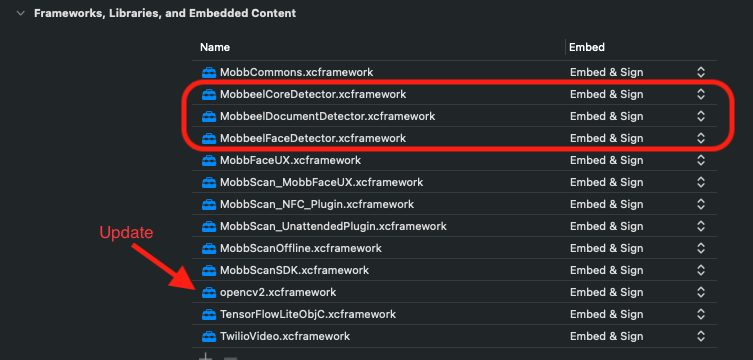
For general instructions on adding and embedding the SDK frameworks, see the SDK configuration guide.
No changes to the document scanning API or its call sequence are required for this detector update.